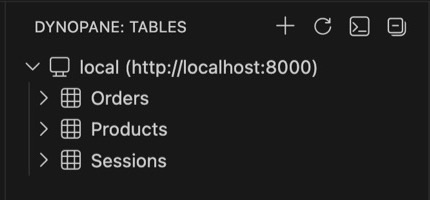
Tables and indexes, at a glance Free
Every table in the region, with its key schema, GSIs and LSIs and item counts, in a tree in the sidebar. You can see which index a query should use before you write it.
 Dynopane
For VS Code, Cursor and Windsurf
Browse tables, run queries and edit items in the sidebar next to the code that writes them — no console tab, no second app.
Install for VS Code Get it for Cursor & Windsurf
Free to browse, query and read items. Pro is $29 once — 14-day free trial, no key needed. Uses the AWS profiles already on your machine; we never ask for access keys.

If the AWS CLI works on your machine, Dynopane works. There is nothing to sign up for.
~/.aws.Five things, done properly for DynamoDB — not a generic SQL grid with a DynamoDB driver bolted on.
Every table in the region, with its key schema, GSIs and LSIs and item counts, in a tree in the sidebar. You can see which index a query should use before you write it.
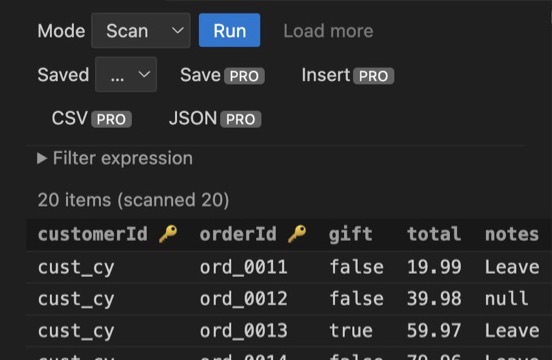
Query by key or scan a table, narrow it with a filter, then open any item as formatted JSON. Reading production data takes one click, not a tab switch and a login.
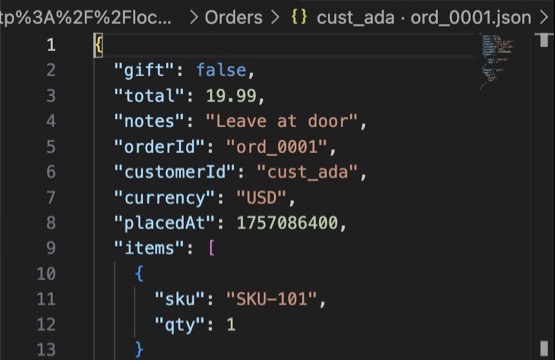
Change an attribute, add a test item, remove a bad row — edits save when you press save, and deletes and PartiQL writes ask for confirmation first, so nothing leaves a table by accident.
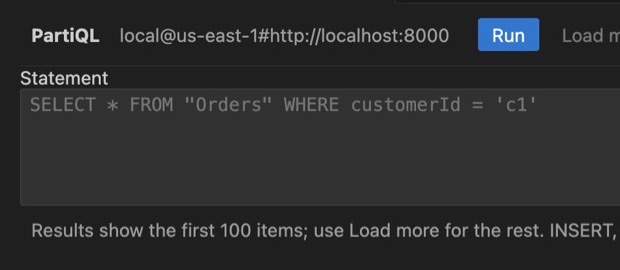
Write PartiQL statements against your tables and read the results in a grid. Export any result set to CSV or JSON, and save the queries you run every day.
Keep staging in us-east-1 and production in eu-west-1 open side by side instead of re-authenticating and re-switching every time you compare them.
Point a connection at DynamoDB Local with an endpoint override and work against test data on a train, or without touching a real account at all.
Dynopane is a client, not a service. There is no Dynopane account, no Dynopane server and nothing to trust us with.
It reads the AWS profiles and SSO sessions the AWS CLI already uses. There is no key form, and no key is ever stored by us.
Requests go from your editor to AWS over HTTPS. Your table names and items never pass through anything of ours.
Nothing is collected, and there is nothing to sign up for. The only thing we ever see is a licence-key check if you buy Pro.
All of these work. Here is what is different, stated plainly.
| AWS console | Dynobase | DBCode | Dynopane | |
|---|---|---|---|---|
| Where it runs | A browser tab | A separate desktop app | Editor extension | Editor extension |
| Built only for DynamoDB | Yes | Yes | No — many databases, one SQL grid | Yes — key schema, GSIs, LSIs, PartiQL |
| Beside the code that writes the table | No | No | Yes | Yes |
| Sign-in | AWS console login | Your AWS profiles | Your AWS profiles | Your AWS profiles, no account with us |
| Price | Free | $9/month billed yearly, or $199 lifetime | Free core; Pro $4/month or $120 lifetime | Free to read; Pro $29 once |
Prices from each vendor's site, September 2026. Dynobase and DBCode are good tools; if you already own one and it fits, keep it.
Free forever for reading. One payment for writing, per developer — no subscription, no seats to manage.
$0 forever
$29 one-time, per developer
14-day trial with no key and no card. 14-day refund, any reason.
| Feature | Free | Pro |
|---|---|---|
| Connect with your AWS profile or SSO session | One profile + region | Unlimited, side by side |
| Browse tables, key schema, GSIs, LSIs, item counts | Yes | Yes |
| Scan and query with a filter | Yes | Yes |
| View any item as JSON | Yes | Yes |
| DynamoDB Local endpoint override | Yes | Yes |
| Edit, insert and delete items (deletes confirm first) | — | Yes |
| PartiQL editor with results grid | — | Yes |
| Export results to CSV or JSON | — | Yes |
| Saved queries | — | Yes |
| Activations per licence | n/a | 5 (each editor install counts as one) |
| Updates | Always current | All future updates |
Checkout is handled by Polar, our merchant of record; prices are in US dollars and tax is added where required.
Something else? Write to support@dynopane.com — a person answers.
No. Dynopane uses the standard AWS credential chain — the profiles and SSO sessions already configured on your machine, the same ones the AWS CLI reads. There is no key form in the extension, and no key is ever stored by us.
From your machine straight to AWS over HTTPS. Dynopane has no server, collects no telemetry and needs no account with us, so your items and table names never pass through anything of ours.
Yes. Install it from the VS Code Marketplace in VS Code, or from Open VSX in Cursor, Windsurf and VSCodium.
Yes. Set an endpoint override and Dynopane talks to your local DynamoDB instead of AWS, so you can work offline or against test data.
A Pro licence for one developer with 5 activations: editing, inserting and deleting items, the PartiQL editor, CSV/JSON export, saved queries and multiple profiles and regions at once. Each editor install is one activation, because VS Code, Cursor and Windsurf each keep their own licence store; five is enough for a laptop, a desktop and a second editor on each, with one spare. Free a slot from your Polar portal when you retire a machine. It is a one-time payment, not a subscription, and it includes all future updates.
Polar emails your receipt; its Access purchase button opens your Polar customer portal, where the key is shown and can be copied at any time. In your editor, run the command Dynopane: Activate Pro and paste it. Details are on the post-purchase page.
No. Dynopane is an independent product from Geary Works. It is not affiliated with, endorsed by or supported by Amazon Web Services.
Free to browse, $29 once to write. On the VS Code Marketplace and Open VSX now.